Bidding and budgets
'Limited by budget' in Google Ads: what it means and what to do
Reviewed September 2026 · All guides
'Limited by budget' means Google Ads predicts the campaign would have entered more auctions, and won more clicks, if its average daily budget were higher. The status carries no judgement on the spend. If the campaign already meets its CPA or ROAS goal and loses a meaningful share of impressions to budget, the status points at profitable volume you are leaving on the table, and a higher budget or a split of budget from weaker campaigns is the answer. If the campaign misses its goal, the budget cap is containing the damage, and the fix is efficiency: a tighter target, fewer wasted queries, better ads.
Read two columns before deciding: Search lost IS (budget) and Search lost IS (rank). Those tell you whether money or competitiveness is holding the campaign back, and they often point in different directions from the status label.
What the status is telling you
Google shows 'Limited by budget' in the Status column when the campaign regularly hits its daily budget and its models predict more traffic at the current bids and targets. Click the status for the budget recommendation, which estimates the extra clicks or conversions a higher budget would buy. That estimate is Google's, based on recent auctions, and it assumes the extra traffic converts at roughly the rate of the traffic you already have.
The status is the start of the diagnosis. A campaign can show it while making money on every euro, and a campaign can show it while losing money on half of them. The two need opposite responses.
When it is a problem, and when it is not
Efficient and capped: a volume problem
The campaign meets or beats its CPA or ROAS goal, loses a steady share of impression share to budget across the last 30, 60 and 90 days, and its budget is its own. This is money the business would spend if it knew the campaign could absorb it. Raise the budget in steps of about 20% and watch the marginal CPA or ROAS, since the extra auctions are rarely as good as the average of the ones you already win.
Inefficient and capped: an efficiency problem
The campaign misses its goal and is capped. The budget cap is doing you a favour: without it, the campaign would buy more of the same expensive conversions. Leave the budget and fix the efficiency. On a Target CPA or Target ROAS strategy, a tighter target makes the bidder skip the least efficient auctions, and the spend it saves goes into better ones. See how to lower CPA without cutting volume and how to improve ROAS.
Capped by choice
Some budgets are fixed by a finance plan, a client contract or a stock level. The status then describes the plan, and there is nothing to act on in it. The useful work is making the fixed budget buy more, which is the efficiency case above.
Impression share lost to budget vs lost to rank
Add Search impr. share, Search lost IS (budget) and Search lost IS (rank) to the campaign table. Together with impression share they add up to 100%, so they show where the missing impressions went.
- High lost to budget, low lost to rank: the campaign wins when it bids and runs out of money. More budget, or a tighter target that buys cheaper clicks, both address it.
- Low lost to budget, high lost to rank: the campaign loses auctions on Ad Rank. More budget changes nothing, because the auctions it loses are ones it could afford to enter. Look at bids or targets, Quality Score, ad relevance and landing page experience.
- Both high: fix rank first. A campaign that loses on rank and also runs out of budget is spending its budget in the auctions it can win, which are often the cheap, low-intent ones.
Check the ad groups as well. One broad ad group can drain the daily budget by mid-afternoon, leaving the high-intent ad groups dark from 3 p.m. onward. The campaign-level figure then understates what the good ad groups lose.
Raising the budget vs raising the target
On a Smart Bidding campaign with a target, you have two dials, and they act differently.
- Raising the budget lets the campaign enter more auctions at the current target. Volume rises; efficiency usually slips a little, because the new auctions are the marginal ones.
- Tightening the target (a lower Target CPA, a higher Target ROAS) makes the campaign skip its least efficient auctions. Spend per conversion falls, the same budget buys more conversions or more value, and the status often clears because the campaign no longer spends the whole budget before the day ends.
Say a campaign has a EUR 1,000 daily budget, a Target CPA of EUR 50, a realized CPA of EUR 48, and loses 25% of impression share to budget. Lowering the target to EUR 43 (a 14% step) would, if it holds, buy about 23 conversions a day from the same EUR 1,000 instead of about 21. Raising the budget to EUR 1,200 would buy more conversions in total, at a CPA that likely drifts above EUR 48. Which is right depends on whether the business wants the cheapest conversions or the most conversions at an acceptable cost.
Since August 2026, Google bids budget-limited Target CPA and Target ROAS campaigns to deliver closer to the target itself. Before, a capped campaign often beat a loose target by a wide margin; now it spends towards the target you set, so a Target CPA of EUR 60 on a campaign that used to convert at EUR 45 can drift up towards EUR 60. Google's Target Adjustment Tool proposes a target from recent performance if you want to keep what the campaign achieved. On a capped campaign, the target is now the number to get right.
On Maximize conversions or Maximize conversion value without a target, the status is close to permanent: those strategies are built to spend the full budget. Read it as information about headroom. Change targets in small steps, as covered in how to change a Target ROAS or Target CPA, and test the step in an experiment where you can.
What to do, in order
- Check whether the campaign meets its CPA or ROAS goal over the last 30 days, excluding days with tracking problems.
- Add Search lost IS (budget) and Search lost IS (rank). Decide whether the campaign is losing to money or to competitiveness.
- If it loses to rank, leave the budget alone and work on bids or targets, Quality Score, ads and landing pages.
- If it loses to budget and misses its goal, tighten the target by 10 to 20% or remove wasted spend first. The search terms guide covers where waste hides.
- If it loses to budget and meets its goal persistently across 30, 60 and 90 days, raise the budget in steps of about 20% and watch the marginal CPA or ROAS.
- If the budget is shared, check per-campaign spend inside it before moving money.
Where GoodLads fits
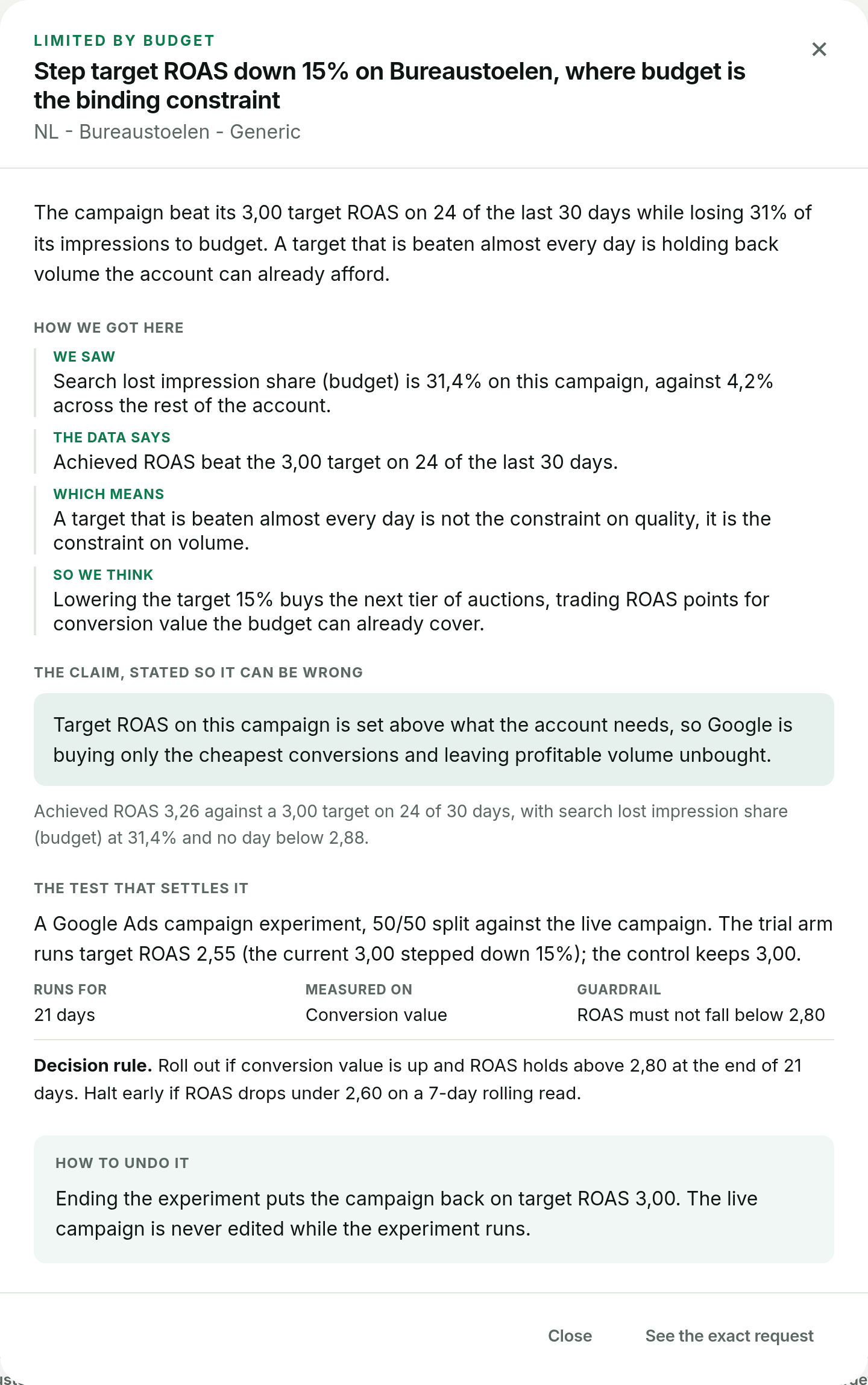
GoodLads reads the budget diagnostic for each Search campaign: daily spend against budget, impression share lost to budget and to rank, and persistence across 30, 60 and 90 days. When a campaign is capped, it proposes making the fixed budget work harder, usually a conservative Target CPA or Target ROAS step run as a Google Ads experiment. When the loss is to rank, it does not propose a target step. It never raises a budget: that stays your decision in Google Ads. The worked demo account shows a budget-limited campaign as GoodLads reads it.
Questions people ask
What does 'Limited by budget' mean in Google Ads?
The campaign regularly hits its daily budget, and Google predicts it would get more clicks or conversions at a higher budget with the current bids and targets.
Should I increase my budget when a campaign is limited by budget?
Only if the campaign meets its CPA or ROAS goal and loses impression share to budget rather than rank. If it misses its goal, tighten the target or cut waste first.
Why does Google Ads spend more than my daily budget?
Google can spend up to 2x the average daily budget on a single day. Over a month it charges no more than the daily budget times about 30.4.
What is the difference between lost impression share budget and rank?
Lost IS (budget) counts impressions missed because the budget ran out. Lost IS (rank) counts impressions missed because Ad Rank was too low, which a higher budget does not fix.