Wasted spend and audits
Google Ads audit checklist for accounts spending EUR 10K+ a month
Reviewed September 2026 · All guides
Audit a Google Ads account in this order: conversion tracking first, then bidding and targets, budgets, search terms, location and network settings, ad copy, Performance Max, and auto-apply recommendations last. The order matters because every later check reads numbers the earlier ones validate. If conversions are double counted, the CPA you judge a search term by is wrong, and so is every bid target built on it.
This checklist is written for accounts spending EUR 10,000 a month or more, where one leaking setting costs four figures a month. For each area it says what bad looks like and which report in Google Ads shows it. Use the last 30 days as the default window, and 90 days for anything with low volume.
1. Conversion tracking
Open Goals > Conversions > Summary. Every conversion action marked Primary feeds Smart Bidding and the Conversions column. Bad looks like: a page view or a 'contact page visit' set as Primary next to the purchase, two actions counting the same purchase (a Google Ads tag and an imported GA4 event both Primary), a status of 'Inactive' or 'No recent conversions' on an action that should fire daily, or 'Every' counting on a lead form where one person submitting twice is one lead.
- Compare the last 30 days of Google Ads conversions with your backend (orders, CRM leads) for the same dates. A gap above roughly 10-15% needs an explanation.
- Check that purchase actions send a value, and that the value is the order value rather than a fixed 1.
- Check the diagnostics for Enhanced conversions and, for EU traffic, that Consent Mode v2 is live. Without it, conversions from users who decline consent are not modelled.
- Look at the conversion lag in the 'Days to conversion' segment before judging the last week of any campaign.
The full list of checks is in the conversion tracking checklist. Stop the audit here if tracking is broken: fix it, then come back.
2. Bidding, targets and budgets
Open Campaigns and add the columns Bid strategy type, Target CPA or Target ROAS, Cost / conv., Conv. value / cost, and Search lost IS (budget). Bid strategy status shows in the Bid strategy type column; portfolio strategies also list theirs under Tools > Budgets and bidding > Bid strategies.
- Target far from reality. A Target CPA of EUR 30 on a campaign that has delivered EUR 55 for three months throttles volume without lowering cost. A target far looser than what the campaign achieves lets it overspend on marginal auctions.
- Strategy status 'Learning' for weeks, or 'Limited' by too few conversions. As a rule of thumb, Smart Bidding wants around 30-50 conversions a month per strategy; below that, a portfolio strategy or a shared target is safer.
- Frequent target changes. The change history shows them. Each change larger than roughly 15-20% can restart learning; the guide to changing targets covers the safe step size.
- Manual CPC or Maximize clicks on campaigns with steady conversion volume, which leaves conversion data unused.
- 'Limited by budget' on a campaign whose CPA or ROAS beats the account average. That is money left on the table; the limited by budget guide covers what to do.
- Budget spread evenly across campaigns whose returns differ by a factor of two or more.
3. Search terms
Open Insights and reports > Search terms, last 30 days, sorted by cost. Add a filter for Conversions = 0. Bad looks like: terms that cost more than your target CPA without converting, competitor or job-seeker terms ('careers', 'salary', 'free', 'login'), and broad match keywords matching terms from an unrelated product line.
Sum the cost of terms with zero conversions and spend above your target CPA. That figure, set against monthly spend, is the most concrete wasted-spend number an audit produces. The search terms guide covers thresholds, negative match types and the risk of over-negating.
4. Location and network settings
- Location options set to 'Presence or interest' on a business that can only serve people physically in the target area. Check Campaign settings > Locations > Location options, then the Matched locations tab under Insights and reports > When and where your ads showed for spend from outside the target countries. The details are in Presence vs Presence or interest.
- Search campaigns with 'Include Google Display Network' ticked. New Search campaigns now start with it unticked, so this is mostly a fault of older campaigns. Segment the campaign by Network (with search partners) and compare the display row's CPA with the search row's.
- Search partners on with a CPA well above Google Search, visible in the same segment.
- Schedule, location and audience bid adjustments left over from Manual CPC days on campaigns now running Smart Bidding, which ignores them. They make the settings look managed when they do nothing.
5. Ad copy and Performance Max
Ad copy
- Ad groups with a single responsive search ad and ad strength 'Poor', or with every headline pinned, which removes the combinations the system can test.
- Ads last edited more than a year ago with no test running. Copy that has never been challenged has no evidence it is the best version.
- Disapproved or 'Eligible (limited)' ads in the Ads view, filtered by Status.
- Assets missing at campaign level: sitelinks, callouts, structured snippets. Check Assets, filtered by association level.
Testing copy is safer through a new ad or an experiment than through edits to a live one; the RSA testing guide covers the method.
Performance Max
- Brand terms absorbing PMax spend. Check the Performance Max search terms report (available since 2025) or the search term insights in the Insights tab, and whether a brand exclusion list is attached in campaign settings.
- A single asset group covering every product, which leaves the feed and audience signals unable to separate margin tiers.
- Final URL expansion on with no URL exclusions, sending traffic to blog or careers pages.
- PMax and Search campaigns targeting the same products with no view of which campaign should own each query. A Search exact match keyword identical to the query wins over PMax; otherwise PMax search themes compete with phrase and broad keywords on ad rank.
6. Auto-apply recommendations
Open Recommendations > Auto-apply. Bad looks like: bid strategy changes, budget changes, keyword additions or broad match upgrades set to apply automatically, with nobody on the team aware of it. Then open Change history, filter the user column for auto-applied recommendations, and read what Google changed in the last 90 days. The auto-apply guide sorts the safe types from the risky ones.
Where GoodLads fits
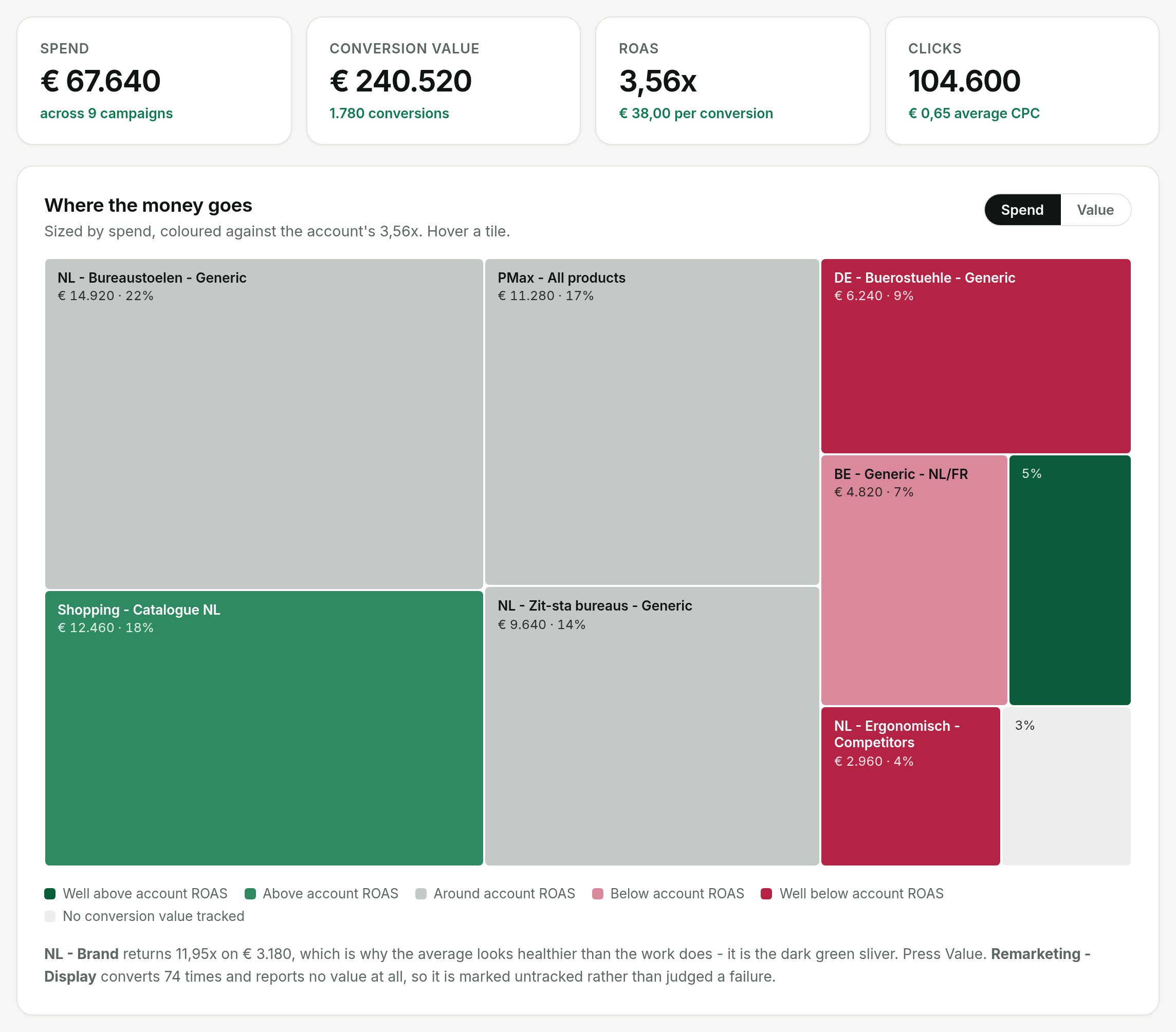
GoodLads runs a free audit that covers part of this checklist. It connects to your account, reads the last 30 days, and computes the figures in code from Google's own rows: spend, ROAS and cost per conversion, campaigns that spend without recording any conversion value (usually a tracking fault), the best and worst campaigns, campaigns losing impressions to budget, the share of spend held by one campaign, and search terms that cost money with zero conversions. It then writes three things worth doing about what it found. It reads and never writes during the audit.
It does not check location options, network settings, auto-apply status, pinned headlines or PMax brand exclusions today. Walk sections 4 to 6 of this list by hand. You can see a sample report on the demo, and what happens after the audit on pricing.
Questions people ask
How often should you audit a Google Ads account?
A full audit once a quarter, with conversion tracking and the search terms report checked monthly. Run a full audit whenever an account changes hands or tracking changes.
What should a Google Ads audit check first?
Conversion tracking. Every other check judges performance through conversions and conversion value, so double counting or a missing value makes the rest of the audit unreliable.
How do I find wasted spend in a Google Ads audit?
Open the search terms report for the last 30 days, filter for zero conversions and sort by cost. Terms that cost more than your target CPA without converting are the first wasted spend to address.
Is there a free Google Ads audit tool?
Google's own Recommendations tab and optimization score are free, and many of their suggestions raise budgets or broaden targeting, so read each before accepting. GoodLads runs a free audit on the last 30 days of one account and writes three priorities from it, without changing anything in the account.