A Google Ads conversion setup is sound when four things hold: only the actions you want bid on are Primary, each real conversion is counted once, every conversion carries a value that tracks what it is worth to the business, and consent and lag are accounted for before anyone reads a CPA. The checklist below walks those in order, from the Goals page to the diagnostics tab, and names the setting to look at for each.
It matters more than any bid or copy change. Target CPA, Target ROAS and Maximize conversion value all optimize toward whatever the Conversions column says. If that column counts a GA4 import and a Google tag for the same purchase, the bid strategy sees twice the volume and bids for it. On an account spending EUR 50,000 a month, that error is paid for every day it runs.
1. Primary vs secondary conversion actions
Open Goals > Conversions > Summary. Each conversion action sits inside a goal (Purchase, Submit lead form, Phone call lead and so on), and each action is either Primary or Secondary. Primary actions are counted in the Conversions and Conv. value columns and are used by Smart Bidding for every campaign that bids on that goal. Secondary actions are recorded in All conv. only: you can report on them, the bid strategy ignores them.
The common fault in large accounts is history. Five years of agencies each added their own action, and eight of them are Primary: a page-view goal, a newsletter signup, a GA4 key event, the original tag, a call extension. The bid strategy is then optimizing toward a blend, and the cheapest item in the blend wins.
List every action marked Primary and the goal it sits in.
For each one, ask whether you would pay the account's target CPA for it. If not, set it to Secondary.
Check which goals are account defaults and whether any campaign overrides them with campaign-specific goals. A campaign bidding on a goal nobody reviews is a common source of drift.
Record the date of the change. Changing Primary actions changes what the bid strategy optimizes toward, and a rule of thumb is to treat the following one to two weeks like a learning period.
2. Double counting: GA4 import plus the Google Ads tag
A common and expensive tracking error is the same purchase counted twice: once by the Google Ads conversion tag (or Google tag with a Google Ads conversion event) and once by a GA4 key event imported into Google Ads. Both are Primary, both fire on the thank-you page, and Conversions reads roughly double what the shop system recorded.
Compare Conversions for Purchase against orders in your backend for the same week. A ratio near 2 points to double counting; a ratio near 1.3 often means a duplicate on part of the traffic.
Pick one source per event. The native Google Ads tag with Enhanced conversions usually gives Google Ads more signal; the GA4 import keeps one set of definitions across tools. Either works if the other is Secondary.
Look for the same event fired twice by the tag itself: a thank-you page reloaded, a single-page app that fires on route change, or both a hard-coded tag and a Tag Manager tag.
3. Counting setting and conversion values
Each action has a Count setting. One counts a single conversion per click, which is right for leads: a person who submits the form three times is one lead. Every counts each conversion, which is right for purchases: a person who buys twice is two orders. A lead form set to Every inflates volume and lowers the reported CPA without a single extra lead reaching sales.
Then values. Target ROAS and Maximize conversion value need a value per conversion that moves with what the conversion is worth.
Ecommerce: pass the order value dynamically, in one currency or with the currency code set, net of VAT if that is how you measure margin. Be consistent: mixing gross and net between actions skews ROAS.
Pass a transaction ID with every purchase. Google Ads uses it to drop duplicate conversions with the same ID, which covers reloads of the confirmation page.
Lead generation: a static value per action is better than no value, and a value that reflects lead quality (see offline imports below) is better still.
Check the Default value on each action. An action that fires without a value falls back to it, and a default of 1 on a purchase action pulls ROAS down.
4. Enhanced conversions and Consent Mode v2
Enhanced conversions sends a hashed (SHA-256) copy of first-party data the customer entered, usually the email address, with the conversion. Google matches it to signed-in users, which recovers conversions that cookies alone miss. Turn it on under Goals > Settings, accept the customer data terms, and check that the tag sends the field: the diagnostics for the action show whether enhanced conversions data is arriving and at what coverage. Since April 2026, enhanced conversions for web and for leads share one on/off setting, and Google Ads accepts the data from the website tag, Data Manager and API connections at once, so there is no longer a method to choose; existing accounts were migrated to it.
Consent Mode v2 applies to users in the European Economic Area, and since March 2024 Google has required consent signals for EEA traffic, through Consent Mode or the IAB TCF, before it uses that data for measurement and personalization. Your consent banner passes four signals to Google tags, two of them added in v2: ad_user_data and ad_personalization. Without them, Google cannot use EEA users' data for measurement and personalization in the same way, and remarketing lists and conversion modeling for those users degrade. There are two implementations:
Basic: tags do not load until the user consents. No data is sent for users who decline, so Google models conversions with a general model, not one built on your account.
Advanced: tags load and send cookieless pings when consent is denied. Google models the missing conversions from those pings, which usually recovers more of the gap. Your legal review decides which one you can run.
Check the consent status in the conversion action diagnostics and in Tag Assistant. A banner that says it implements Consent Mode but never sends the v2 parameters is common, and it shows up as a drop in EEA conversions on the date the banner changed.
5. Offline conversion imports and lead quality
For lead generation, the form submit is a proxy. If 30% of leads are qualified and 5% close, a bid strategy optimizing for form submits will find you more of whatever fills in forms cheaply. Importing what happens after the form fixes the target.
Capture the GCLID with every lead in your CRM, and the email or phone number too: Google recommends upgrading GCLID imports to Enhanced conversions for leads, which matches on the hashed email or phone and keeps the GCLID where you have it.
Create an import conversion action for the stage that matters: qualified lead, opportunity, closed deal. Give it a value.
Upload on a schedule (Google Ads Data Manager, a CRM integration, or an API), daily if you can. GCLID conversions can be imported up to 90 days after the click, Enhanced conversions for leads up to 63 days. From 15 June 2026, Google moved offline conversion and Enhanced conversions for leads uploads from the Google Ads API to the Data Manager API, with legacy access kept only for integrations that were already active, so check which one your connector uses.
Once the imported action has volume, move it to Primary and the form submit to Secondary. Treat that switch as a change of optimization goal, and consider running it as an experiment on one campaign first.
Volume is the constraint. Smart Bidding needs enough conversions to learn, and a closed-deal action with eight conversions a month is too thin to bid on alone. A qualified-lead stage in between is often the workable compromise.
6. Conversion lag and the attribution model
Google Ads records a conversion against the date of the click, not the date of the conversion. If the median buyer converts four days after clicking, yesterday's CPA looks bad today and fine next week. Before reading recent performance, check the lag: the Days to conversion segment (under Segments > Conversions > Days to conversion) shows how long conversions take in your account.
Treat the most recent days, up to your typical lag, as provisional. For a B2B account with a 14-day lag, that is the last two weeks.
Do not judge an experiment or a bid change until its window has closed plus the lag. The same rule applies in reading experiment results.
Check the conversion window on each action. The default click-through window is 30 days; a 90-day window on a lead action makes the lag longer still.
Attribution: data-driven attribution is the default for new actions, and Google removed first click, linear, time decay and position-based in 2023. What remains is data-driven or last click. Data-driven spreads credit across the ad interactions on the path, which usually gives upper-funnel and generic campaigns more credit than last click did. Changing the model changes how credit is split from that day on, and Smart Bidding bids to the new numbers, so note the date.
7. How to verify it in diagnostics
Once the settings are right, confirm they are working. The Summary page and each action's Diagnostics tab carry most of what you need.
Read the Status column on Goals > Conversions > Summary. "Recording conversions" is healthy. "Inactive", "Unverified" and "Needs attention" each mean the action is not doing its job; "No recent conversions" means the tag fires but nothing was recorded in the last 7 days, which on a low-volume action can be normal and on a purchase action is not.
Open the Diagnostics tab of each Primary action. It reports tag firing, Enhanced conversions coverage, consent signals and import health where they apply.
Run a test purchase or lead with Tag Assistant open and confirm one conversion event fires, with the value and transaction ID you expect.
Reconcile a full week of Conversions and Conv. value against your backend. Expect some gap from consent and cross-device paths; a gap that changes suddenly usually marks a tracking change.
Look at the bid strategy report for each Smart Bidding campaign. A status of "Learning" or "Limited" right after a conversion change is expected; a status that stays "Misconfigured" points back to the goal settings.
Where GoodLads fits
GoodLads reads the conversion data the account already has; it does not install tags, configure Consent Mode or run offline imports. Its free audit reads the account through those numbers and names the three things worth doing about it; a worked example account shows what that looks like. Every recommendation it writes afterwards is measured against the Conversions column, so the checks above come first. The broader account review lives in the Google Ads audit checklist, and bid targets set on top of clean data are covered in Target CPA vs Target ROAS.
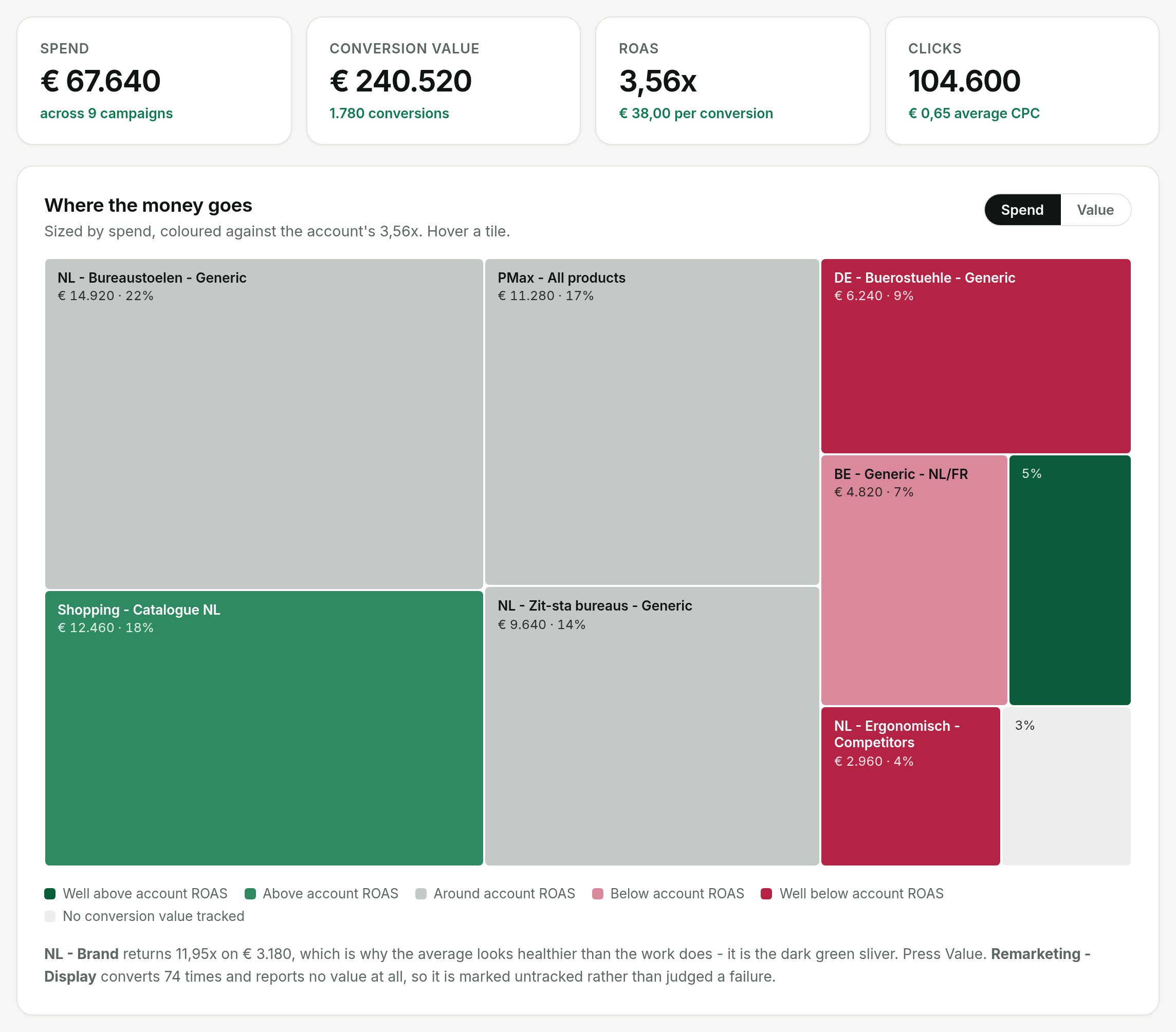
Tracking gaps show up on the overview before they show up in a recommendation: the pale tile is a campaign that converts but reports no value, so it is marked untracked instead of judged a failure. From the demo account
Questions people ask
What is the difference between primary and secondary conversion actions in Google Ads?
Primary actions appear in the Conversions column and are used by Smart Bidding. Secondary actions are recorded in All conv. for reporting only and do not affect bidding.
Why is Google Ads counting double conversions?
The usual cause is the same event tracked twice as Primary: a Google Ads conversion tag and an imported GA4 key event on the same purchase. Keep one as Primary, set the other to Secondary, and pass a transaction ID so duplicate purchases are dropped.
Should conversions count one or every?
One for leads, so repeated form submits from the same click count once. Every for purchases, so each order counts.
Do I need Consent Mode v2 for Google Ads?
If you advertise to users in the European Economic Area, yes. Without the ad_user_data and ad_personalization signals, Google cannot use those users' data for measurement and remarketing in the same way, and conversion modeling for them degrades.
Why do recent days show fewer conversions in Google Ads?
Conversions are attributed to the click date, so any conversion that happens days after the click fills in later. Check the Days to conversion segment and treat recent days inside that lag as provisional.